How to Get Transcript of YouTube Video: Complete Guide 2025

October
10/27/2025
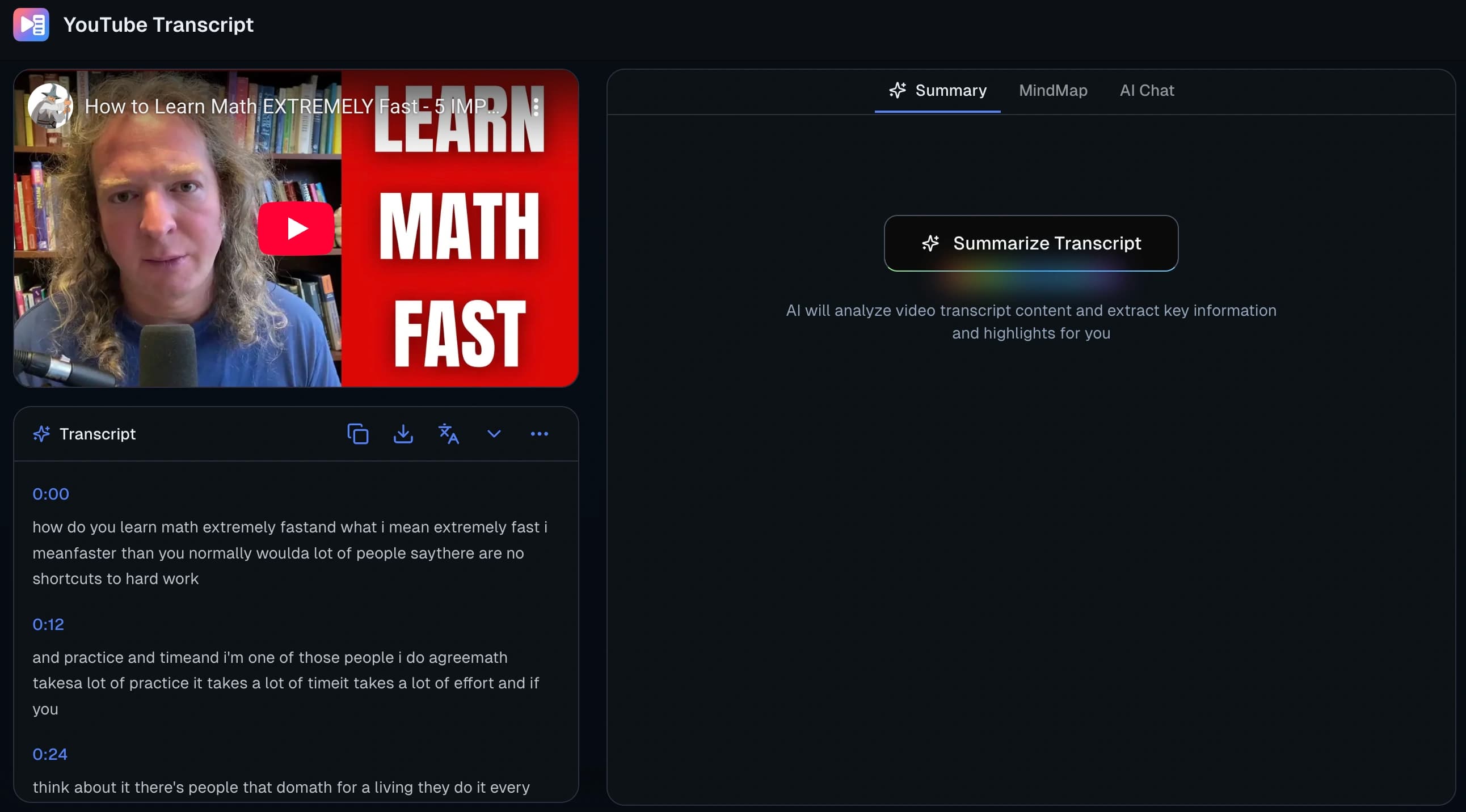
Introduction
Getting a transcript of a YouTube video is essential for various purposes - from creating study notes to repurposing content. This guide will show you how to extract accurate transcripts using our tool and leverage AI features to enhance your workflow.
What is a YouTube Transcript?
A YouTube transcript is a text version of the spoken content in a video. It includes:
- All spoken words converted to text
- Timestamps for synchronization
- Speaker identification (when applicable)
- Punctuation and formatting for readability
Transcripts are valuable for:
- Students: Creating study notes and searchable content
- Content creators: Repurposing video content into articles
- Researchers: Analyzing video content and extracting information
- Professionals: Creating meeting records and documentation
Step 1: Getting the Basic Transcript
Preparation
Before you start, ensure you have:
- A YouTube video URL (public videos only)
- Stable internet connection
- Clear audio quality in the video
The Transcription Process
-
Copy YouTube Video URL
- Navigate to the YouTube video
- Click the "Share" button
- Copy the video link
-
Paste into Our Tool
- Open our transcription tool
- Paste the URL into the input field
- Verify the link is correct
Alternative Tools:
- You can also use YouTube Transcript Generator for quick basic transcripts
- Compare different tools to find the best fit for your needs
-
Start Transcription
- Click the "Transcribe" button
- Wait for processing (typically 2-5 minutes)
- Receive notification when complete
-
Access Your Transcript
- View the full text on screen
- Copy to clipboard
- Download in preferred format
Supported Formats
Our tool supports multiple download formats:
- TXT: Plain text for easy reading and editing
- SRT: Subtitle format for video captioning
- VTT: Web video subtitle format
- JSON: Structured data for programming use
Step 2: Enhancing Your Transcript with AI
Once you have the basic transcript, you can use our AI features to extract more value from the content.
AI Summary Feature
The AI summary helps you quickly understand the main points of a long video:
How it works:
- Analyzes the entire transcript
- Identifies key themes and topics
- Extracts important information
- Generates concise summaries
Summary types available:
- Brief: 100-word overview
- Medium: 300-500 word summary
- Detailed: 1000+ word comprehensive summary
Best use cases:
- Quick content review before deep reading
- Creating executive summaries
- Determining if a video is relevant to your needs
- Preparing meeting or class discussions
Mind Map Generation
Transform linear text into structured visual diagrams:
What it does:
- Identifies content hierarchy
- Creates logical connections between topics
- Generates visual node-based diagrams
- Allows for custom editing and styling
Benefits:
- Better content organization
- Visual learning aid
- Quick topic identification
- Easy content sharing
Ideal for:
- Educational content organization
- Meeting structure visualization
- Content planning and brainstorming
- Knowledge management
AI Chat Assistant
Interact with your video content through conversational AI:
Features:
- Ask questions about video content
- Get explanations for specific topics
- Receive contextual answers based on transcript
- Support for multi-turn conversations
Example questions you can ask:
- "What are the main arguments in this video?"
- "Explain the concept mentioned at 10:30"
- "What data or statistics were presented?"
- "How can I apply these methods in practice?"
Use cases:
- Deep learning and clarification
- Homework and research help
- Content analysis and fact-checking
- Interactive study sessions
Step 3: Practical Applications
For Students
Study Note Creation:
- Transcribe lecture videos
- Generate AI summary for quick review
- Create mind maps for visual learning
- Use AI chat to ask follow-up questions
Research Projects:
- Extract quotes and data from interviews
- Analyze multiple videos on same topic
- Compare different viewpoints
- Create annotated bibliographies
For Content Creators
Content Repurposing:
- Convert videos to blog posts
- Create social media snippets
- Generate email newsletter content
- Produce podcast show notes
Content Planning:
- Analyze successful video structures
- Identify trending topics in your niche
- Extract content frameworks
- Generate content ideas
For Professionals
Meeting Documentation:
- Transcribe recorded meetings
- Generate action item summaries
- Create mind maps of discussion points
- Extract decisions and outcomes
Training Materials:
- Convert training videos to text manuals
- Create quick reference guides
- Generate knowledge base articles
- Produce interactive learning materials
Step 4: Best Practices for Quality Results
Choosing the Right Videos
Optimal video characteristics:
- Clear, professional audio quality
- Single speaker or clearly separated speakers
- Consistent speaking pace
- Minimal background noise
- Standard accents and clear pronunciation
Videos that work best:
- Educational lectures and tutorials
- Business presentations and talks
- Interviews with clear audio
- Product demonstrations
- Conference presentations
Challenging scenarios:
- Multiple speakers talking simultaneously
- Heavy background noise or music
- Strong accents or dialects
- Technical jargon without context
- Multiple languages in one video
Improving Transcription Quality
Before transcription:
- Test audio quality first
- Ensure video is publicly accessible
- Check for copyrighted content restrictions
- Verify video language settings
After transcription:
- Review for accuracy, especially technical terms
- Edit punctuation and formatting
- Verify speaker identification
- Add context-specific notes
Maximizing AI Feature Benefits
For AI summaries:
- Choose appropriate summary length
- Review and edit generated summaries
- Combine summaries from multiple videos
- Use summaries as content outlines
For mind maps:
- Start with auto-generated structure
- Customize colors and styling
- Add personal notes and connections
- Export in multiple formats for different uses
For AI chat:
- Ask specific, well-formulated questions
- Provide context for better answers
- Follow up with clarifying questions
- Use chat to explore content deeply
Comparison: Our Tool vs Other Methods
| Feature | Our Tool | GetYouTubeTranscript.org | YouTube Built-in | Manual Transcription | |---------|----------|------------------------|------------------|---------------------| | Transcription | ✅ Automatic | ✅ Basic Automatic | ❌ Limited to captions | ❌ Time-consuming | | AI Summary | ✅ Included | ❌ Not available | ❌ Not available | ❌ Manual work | | Mind Mapping | ✅ Automatic | ❌ Not available | ❌ Not available | ❌ Manual creation | | AI Chat | ✅ Interactive | ❌ Not available | ❌ Not available | ❌ Not possible | | Multiple Formats | ✅ TXT/SRT/VTT/JSON | ✅ Basic formats | ❌ Copy only | ❌ Manual formatting | | Accuracy | High | Medium | Variable | Depends on skill | | Time Required | Minutes | Minutes | Immediate | Hours |
Troubleshooting Common Issues
Transcription Problems
Low accuracy:
- Check video audio quality
- Ensure single dominant speaker
- Verify language settings
- Try shorter video segments
Processing failures:
- Verify video is publicly accessible
- Check internet connection stability
- Confirm YouTube video is still available
- Try refreshing the page
Format issues:
- Ensure correct URL format
- Check for special characters in URL
- Verify video isn't private or deleted
- Test with a different video
AI Feature Issues
Summary generation problems:
- Ensure transcript is complete
- Check content length (very short/long videos)
- Try different summary lengths
- Refresh and retry if needed
Mind map creation failures:
- Verify content has clear structure
- Try with more organized content
- Check for technical issues
- Contact support if persistent
Chat not responding:
- Confirm transcript is loaded
- Check internet connection
- Try rephrasing questions
- Clear browser cache if needed
Advanced Tips and Techniques
Workflow Optimization
For regular users:
- Create templates for different content types
- Develop standard naming conventions
- Build a library of frequently used formats
- Set up automated workflows where possible
For teams:
- Share transcripts and AI results easily
- Collaborate on mind map editing
- Use chat features for team discussions
- Maintain consistent formatting standards
Content Analysis Techniques
Multi-video analysis:
- Transcribe series of related videos
- Compare content across different sources
- Identify trends and patterns
- Create comprehensive topic summaries
Deep content exploration:
- Use AI chat to explore complex topics
- Generate multiple summary versions
- Create detailed mind maps
- Extract specific data points and quotes
Future Features and Updates
We're continuously improving our tool with:
- Enhanced accuracy for challenging audio
- Additional language support
- Advanced AI analysis features
- Better integration options
- Mobile app development
- Real-time transcription capabilities
Conclusion
Getting YouTube video transcripts doesn't have to be complicated. With our tool, you can:
- Extract accurate transcripts in minutes
- Enhance understanding with AI summaries
- Visualize content through mind maps
- Interact deeply with AI chat features
Whether you're a student, content creator, or professional, these tools can help you make the most of video content by making it searchable, analyzable, and repurposable.
Start by trying a simple video transcription, then explore the AI features to discover how they can enhance your workflow. The combination of accurate transcription and intelligent analysis tools provides a powerful solution for anyone working with video content.
Additional Resources
For quick basic transcription needs, you might also want to try:
- YouTube Transcript Generator - Simple, straightforward transcription tool for basic needs
While our tool offers comprehensive AI-powered features, having multiple options allows you to choose the right tool for your specific requirements.
This guide covers the complete process of getting YouTube transcripts and utilizing AI features to maximize their value. Experiment with different features to find the workflow that works best for your specific needs.